
Comparisons
Static vs Dynamic QR Codes
What the redirect actually buys you, measured on real encoded codes, and which payloads are worse off for it.
16 min readFill in the contact, scan the code, and the phone offers to save it. The details live in the pattern itself, so there is no profile page to host, no account, and nothing that stops working when a subscription lapses.
Fill in fewer boxes than you think. The table further down shows what each one costs you in print size, and one of them is expensive.
Your code appears here as you type.
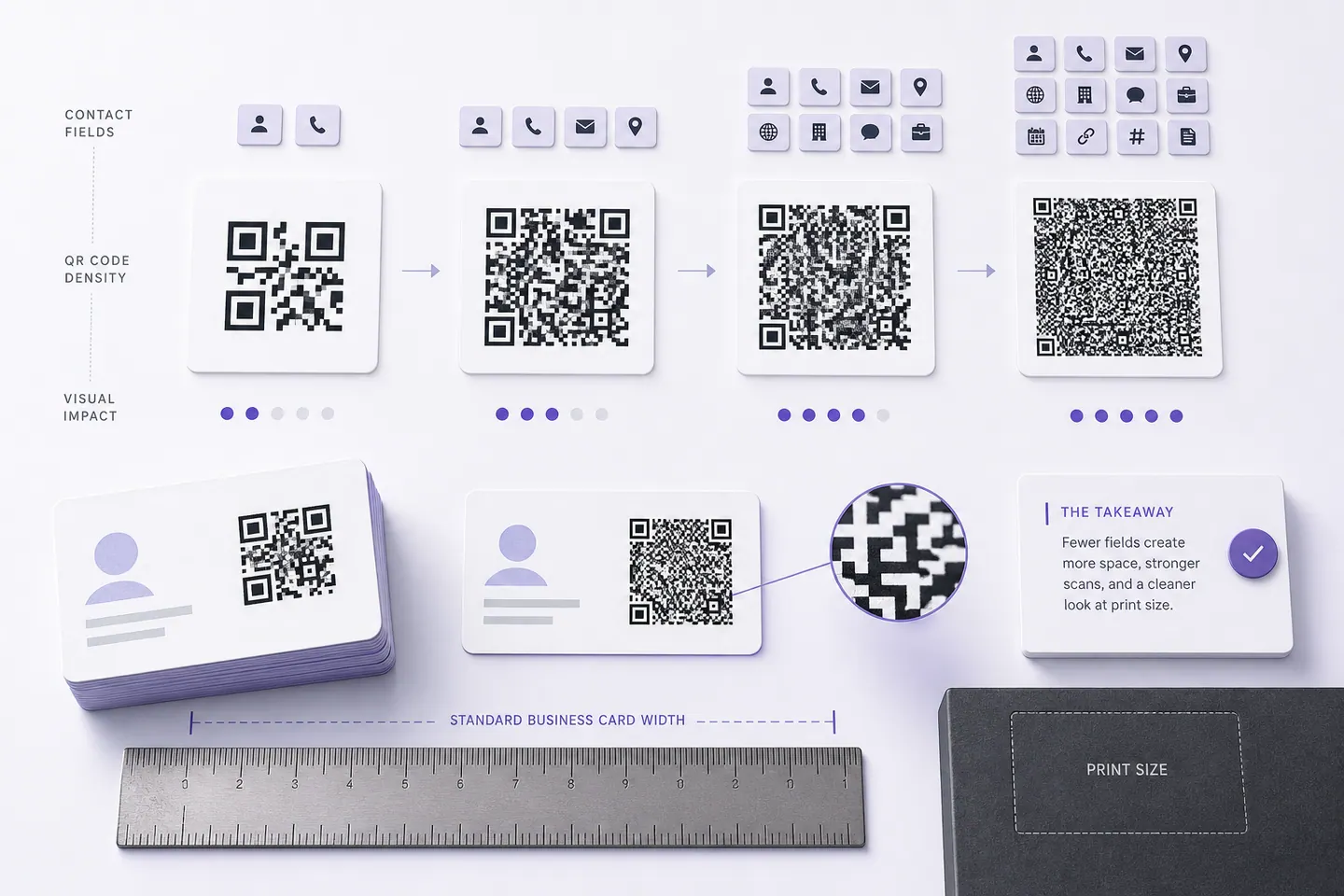
A contact card is the densest thing most people ever put in a QR code. Every field is characters, characters are modules, and modules decide how small the code can be printed before a phone gives up on it. The form on every other generator implies all the boxes are free.
| Card contains | Characters | Modules | Added | Min print |
|---|---|---|---|---|
| Name onlyThe floor. Two name lines plus the vCard wrapper, before a single detail. | 71 | 45 | baseline | 18 mm |
| Add phoneThe reason most people scan a contact card at all. | 103 | 49 | +4 | 19.6 mm |
| Add emailCheap, and the field most likely to be typed wrong by hand. | 140 | 57 | +8 | 22.8 mm |
| Add company and titleTwo properties, and the longest company name you have is the one that hurts. | 195 | 65 | +8 | 26 mm |
| Add websiteA full URL is expensive. A short one on your own domain costs less than half. | 224 | 69 | +4 | 27.6 mm |
| Add postal addressThe most expensive field on the card, and the one nobody has ever scanned a business card to get. | 281 | 73 | +4 | 29.2 mm |
Filling in every box takes the same contact from 45 modules to 73, and the minimum print width from 18mm to 29.2mm. As MECARD, the full contact comes back down to 61 modules and 24.4mm against 73 and 29.2mm for the vCard, which is the whole argument for the older format and the whole risk of it.
My rule: name, phone, email. Company if the card is for work. Everything else earns its place or comes off. Nobody has ever scanned a business card to get a postal address, and it is the most expensive line on the card.
The format dropdown in the editor switches between the two. vCard 3.0 is RFC 2426, the same thing inside a .vcf attachment, and it is what address books are built to read. MECARD is the compact one: about half the length for the same contact, measured above, with no published specification and support that varies by scanner because it came out of Japanese feature phones.
Use vCard. Reach for MECARD only when the code has to be physically small and you can test it on the phones your audience carries. We have not run that test across devices, so this page is not going to tell you it works everywhere.
A full card is the largest of the contact payloads, so it is worth knowing the cheaper ones. An email code opens a pre-addressed message, and a phone code is the smallest symbol on this site. Either fits where a full card will not, such as the margin of a printed CV.
A QR code carrying a contact card rather than a link, so scanning it offers to save the person straight into the phone's address book with no network involved. The format inside is vCard 3.0, which is RFC 2426, the same thing an emailed .vcf attachment contains. Nothing is hosted, so the code keeps working forever and there is nothing to pay for.
It depends entirely on how many fields you filled in, and the table on this page measures it. Name and phone alone is a small symbol that prints comfortably at business-card scale. Add a company, a job title, a long URL and a postal address and the same card needs noticeably more width for the modules to stay readable. Print at or above the minimum width shown under the preview, and drop the address first if you need it smaller.
vCard unless you have a reason. It has a published specification and it is what address books implement. MECARD is roughly half the length for the same details, which is a real saving on a small print, but it came from Japanese feature phones and has no RFC behind it, so support varies by scanner. Both are generated here and the comparison below is measured on the same contact. We have not tested MECARD across a range of phones, so treat the format switch as an experiment you verify before printing.
No, and no other generator can either. A vCard photo is a base64 image inside the card, and a QR symbol holds 2953 bytes at its absolute limit, so even a small portrait misses by an order of magnitude. What some tools do instead is host a profile page and encode a link to it, which is a different product with a subscription attached. The measurement is on the image page if you want the arithmetic.
No. The details are inside the pattern, so a printed card is a snapshot of the day it was printed. That is the trade for a code that needs no server, no account and no subscription. If your details change often, encode a short link to a page you control instead, and read the static versus dynamic guide first.
Contact cards, Wi-Fi, and forms people fill in.
What the redirect actually buys you, measured on real encoded codes, and which payloads are worse off for it.
16 min readThe usable square inside a round sticker is 70% of its diameter. Measured minimum sizes for real links, against every common sticker size.
8 min readWhat each platform already ships, the measured cost of each payload type, and how to check an offline claim yourself.
26 min read
